Prerequisites
- Set up your Signal K server - Signal K is an open-source data server for boats. This guide is for a vessel whose Signal K server already receives position and weather data from the instruments on board.
- Check the data your instruments provide - the plugin reads the vessel position (
navigation.position) and whichever of these your instruments deliver: wind speed, wind direction, outside temperature, pressure and humidity. A value your vessel does not have is simply not sent. - Register your station - go to My Stations and add a station for your vessel, if you do not have one yet.
- Create an API key - go to API Keys and create a key. The plugin needs it to move your station on the map as the vessel moves.
Steps
The exact menu names may vary depending on your Signal K server version.
- Open the Signal K admin interface in your browser.
- Navigate to Apps & Plugins -> Store, search for
signalk-windy-apiv2and install it. - Restart the Signal K server.
- Navigate to Apps & Plugins -> Configuration and select Windy API v2 Reporter.
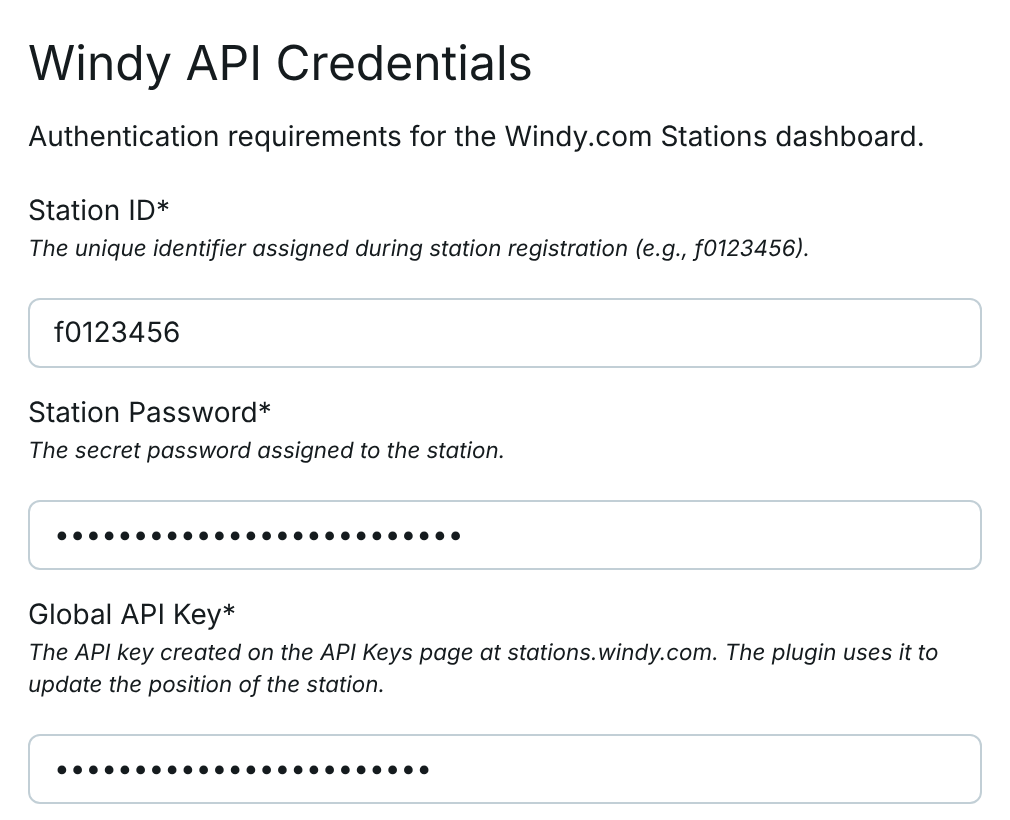
- Fill in the following fields:
- Station ID: enter the Station id of your station.
- Station Password: enter the Station password of your station.
- Global API Key: enter the API key you created.
- Display Name: the name of your station on the Windy map, for example the name of your vessel.
- Share Option:
PublicorWindy only. - Reporting Interval (Minutes):
5is the default and the minimum. Windy accepts one observation per station every 5 minutes. You can use a longer interval if needed.
- Save your changes by clicking the
Save Configurationbutton. Saving the configuration for the first time also enables the plugin. - Open the Signal K Dashboard. After about 15 seconds the line of the plugin shows the values it sent and a countdown to the next report.

You can find your Station id and Station password on the station detail page in Windy Stations: My Stations -> station -> Connection.
The plugin sends wind speed, gusts, wind direction, temperature, pressure and humidity. It also updates the position of your station when the vessel has moved more than 300 meters; you can change this distance in the plugin configuration.
After saving, your station should start sending data automatically. The first update may take a while before the station becomes active and starts showing live measurements on windy.com.
For all settings, the meaning of the dashboard line and troubleshooting, see the plugin documentation.
Author: Peter Petrik