Prerequisites
- Set up your Garni station and connect it to the internet - follow the user documentation that came with your station.
- Access the Garni administration - the simplest option is to use the WSLink mobile application (many users find the application very buggy, so please be patient)
Steps
The exact configuration options may vary depending on your firmware version.
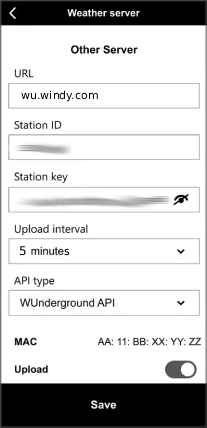
- Open the WSLink application and choose your station.
- Navigate to Device Settings -> Weather server -> Other server.
- Fill in the following fields:
- URL:
wu.windy.com(do not includehttp://,https://, a trailing slash/, or a path; it must be entered exactly as shown) - Station ID: enter the Station id of your station
- Station key: enter the Station password of your station
- Upload interval:
5 minutes. Do not send data more often than once every 5 minutes; otherwise, your requests will be blocked by the rate limiter. You can use a longer interval if needed. - API Type:
WUnderground API - Upload: ensure this checkbox is checked
- URL:
- Save your changes by clicking the
Savebutton.
You can find your Station id and Station password on the station detail page in Windy Stations: My Stations -> station -> Connection.