Prerequisites
- Set up your Ecowitt weather station and connect it to the internet - follow the user documentation that came with your station.
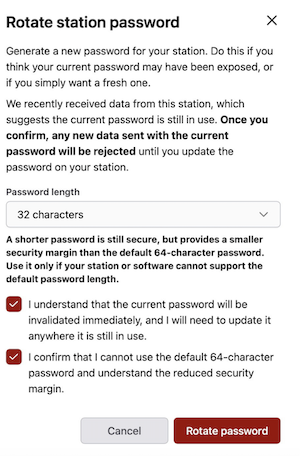
- Change the Station Password - go to My Stations and click your station. On the Connection tab, find Station Password, click Change, and set the password length to 32 characters.
- Access the Ecowitt administration - the simplest option is to use the Ecowitt mobile application.
Steps
The exact configuration options may vary depending on your firmware version.
- Open the Ecowitt application and select your weather station.
- Navigate to Device Settings -> Others -> DIY Upload Servers.
- Select Customized.
- Set Customized to Enable.
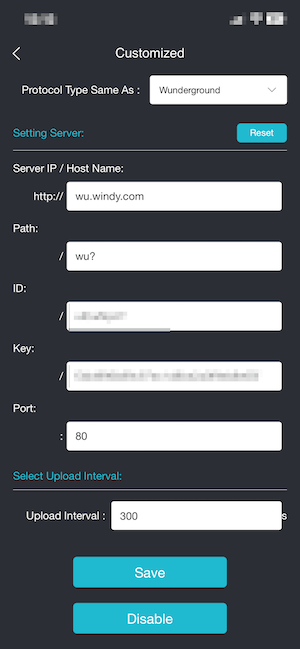
- Fill in the following fields:
- Protocol Type Same As:
Wunderground - Server IP / Hostname:
wu.windy.com - Path:
/wu?(include the final?exactly as shown). If your station does not accept the leading/, trywu?instead. - Station ID: enter the Station id of your station.
- Station Key: enter the Station password you changed to 32 characters as described above.
- Port:
80for HTTP, or443if your station supports HTTPS. - Upload Interval:
300means 5 minutes. Do not send data more often than once every 5 minutes; otherwise, your requests will be blocked by the rate limiter. You can use a longer interval if needed.
- Protocol Type Same As:
- Save your changes by clicking the
Savebutton.
You can find your Station id and Station password on the station detail page in Windy Stations: My Stations -> station -> Connection.
After saving, your station should start sending data automatically. The first update may take a while - in some cases, up to an hour before the station becomes active and starts showing live measurements on windy.com.